

Modern applications can look complete in a browser while search engines receive little more than an empty container. JavaScript SEO rendering issues arise when content, links, or metadata depend on code that crawlers cannot reliably discover or execute. The solution is not automatically to abandon a JavaScript framework: first identify the missing signal, then choose a rendering and testing approach that fits the application.
This guide walks through a practical diagnosis, from comparing raw HTML with the rendered page to testing crawl access, fixing rendering architecture, and monitoring indexing outcomes. It also explains how to separate genuine technical failures from normal indexing delays and other dynamic content indexing problems.

1. Understand JavaScript SEO Rendering Issues Before Changing Code
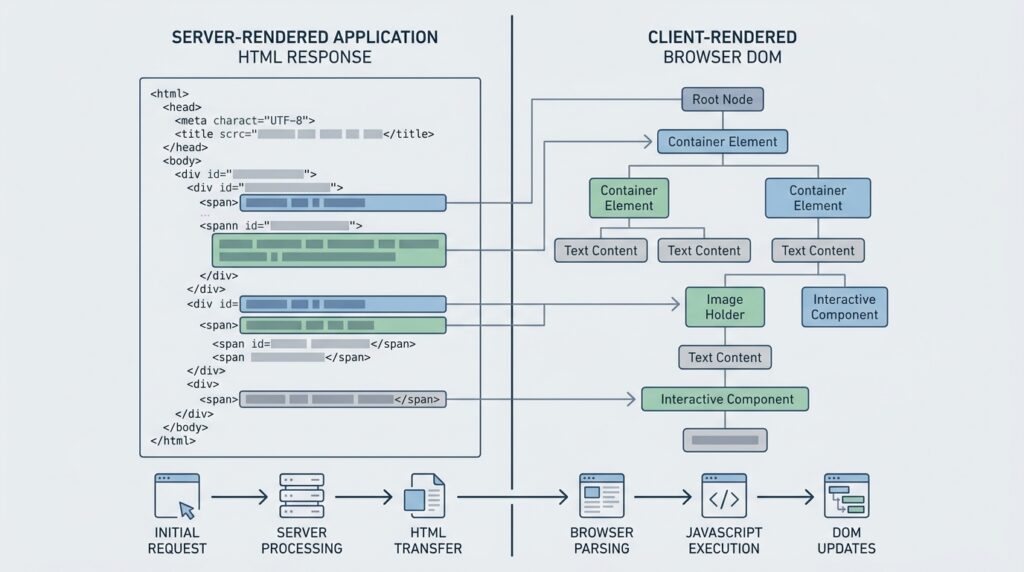
Search engines generally need to discover a URL, fetch it, process its content, and decide whether it belongs in the index. With a traditional server-rendered page, the initial response usually contains the main text and links. With a client-rendered application, the server may return a minimal document and JavaScript must request data, build the interface, and insert the meaningful content later. JavaScript SEO rendering issues appear when one of those steps fails or produces a different result for a crawler.
Start by defining the page elements that matter for search. For a product detail page, that might include the product name, description, price availability, canonical URL, title, and links to related categories. For a directory or editorial application, it may include the article body, author details, pagination links, and structured data. A page that renders its navigation but omits the main content is not successfully rendered for SEO, even if it looks interactive after a user clicks a control.
Do not assume that a blank-looking initial response proves a problem, or that a visually correct browser page proves there is no problem. Search engines can render JavaScript, but rendering requires additional processing and can be affected by blocked resources, execution errors, slow API calls, or application state. Google explains its processing model in its JavaScript SEO documentation. Treat rendering as a testable stage, not a guarantee that every visitor or crawler receives identical output.
Choose a representative sample rather than inspecting one homepage. Include a category page, a detail page, a page with pagination, a route requiring authentication, and a URL with query parameters if those patterns exist. Record the expected content and links for each sample, then compare that checklist with the actual response and rendered result. This makes diagnosis specific: you can identify whether the failure affects one template, one API, or the entire application.
Also separate rendering failures from other dynamic content indexing problems. A URL may render correctly but remain excluded because it is marked noindex, canonicalized to another page, blocked by robots.txt, or considered a duplicate. Conversely, an indexable URL may have poor search visibility because its content is thin or its internal links are weak. Rendering tests answer whether the search engine can access the intended page content; they do not by themselves guarantee inclusion or rankings.
- List the content, metadata, and links that must exist on each template.
- Identify the route patterns and API calls used to create those elements.
- Check whether the page should be indexable before investigating its appearance in search.
- Keep a baseline sample so later fixes can be compared against known failures.
Use that baseline to decide what to investigate next. If the expected article text is missing from the rendered output, inspect execution and data delivery. If the text is present but the URL is excluded, check indexing directives, canonicals, duplication, and discovery. This distinction prevents teams from spending weeks rewriting a frontend when the actual issue is a single directive or a route that no internal link reaches.
2. Reproduce JavaScript SEO Rendering Issues with the Right Tests
Use at least three views of a page: the HTTP response source, a browser with JavaScript enabled, and a crawler-style rendered inspection. The response source shows what the server sends before scripts run. The normal browser view shows what a user ultimately sees. A rendered inspection helps reveal whether a search engine can execute the scripts and access the content. These views answer different questions, so relying on only one can conceal JavaScript SEO rendering issues.
Compare source HTML with the rendered DOM
Open the URL in a browser, then use View Source or a command-line request to inspect the original HTML. Search for the main page heading, a unique sentence, the canonical tag, and a representative internal link. If those elements are absent from the response, the route is probably client-rendered or dependent on later requests. That is not automatically a defect, but it establishes that the page depends on successful rendering.
Next, inspect the live DOM in browser developer tools. Confirm whether the missing elements appear after scripts complete, and check the Console for uncaught exceptions. In the Network panel, filter to Fetch/XHR and inspect the requests that supply page data. A failed request, a 401 or 403 response, a CORS error, or a response that arrives after the application has stopped waiting can explain an empty page. Pay attention to throttling and timing: a page that works on a fast developer connection may fail under slower conditions.
For a Google-specific check, submit a representative URL in Search Console’s URL Inspection tool and review the live test, rendered screenshot, detected HTML, and resource-loading details. The screenshot can show whether the page appears incomplete, while the rendered HTML helps confirm whether key text and links exist. A screenshot alone is not proof of indexability; check the reported indexing and crawl information as well. If you need a broader view of crawl activity, server logs can reveal whether Googlebot fetched the page and its required JavaScript or API endpoints.

Read failures as evidence, not as a verdict
When the rendered result lacks content, check whether the crawler can fetch the scripts and data endpoints. Review robots.txt rules, authentication requirements, firewall controls, rate limits, and responses that vary by user agent. Avoid treating user-agent-based delivery as a fix: serving substantially different content to crawlers can create cloaking risk. The aim is to make the useful page available consistently, not to create a special crawler-only experience.
Google’s Rich Results Test can help inspect supported structured data and the rendered page, but it is not a universal indexability test. Use it alongside URL Inspection and ordinary browser checks. If a structured-data test fails, determine whether the underlying visible content also fails; fixing schema alone will not restore missing article text or links.
When a test is inconsistent, repeat it after clearing cache and record the time, URL, device setting, and result. Compare a healthy URL from the same template with a failing one. The difference may expose a data-specific exception, such as an unpublished record, a locale mismatch, or an API response that omits one field. This comparative method is more useful than repeatedly testing the same broken URL without changing any diagnostic condition.
Finally, capture evidence before editing code: response status, source HTML, console errors, key network requests, rendered screenshot, and indexing directives. That record helps developers reproduce the problem and gives SEO teams a way to verify that a proposed change actually addresses the observed failure. For recurring dynamic content indexing problems, include the template name and affected route pattern in the bug report rather than sending only an isolated URL.
3. Choose Client Side Rendering Solutions That Fit the Page
The most appropriate client side rendering solutions depend on how quickly content must be available, how often it changes, and whether each route is intended to attract organic search traffic. There is no single rendering mode that suits every application. A public product catalog may benefit from server-rendering important fields, while a private account dashboard may not need search indexing at all. Make the decision by page type and user need, not by framework fashion.
Use server rendering or static generation for key routes
Server-side rendering sends a meaningful HTML response for each request, then hydrates the page so interactive features work in the browser. It is useful when content changes frequently and search-critical information should be present immediately. Static generation builds HTML ahead of time, making it a strong option for content that changes less often. Incremental or on-demand regeneration can balance freshness and delivery efficiency where the framework supports it.
Prerendering can help when a set of public routes is predictable, but it requires a reliable process for rebuilding pages when underlying data changes. If generated pages are stale, search engines and users may see old prices, descriptions, or availability. Establish cache invalidation rules, monitor build failures, and make sure the generated HTML contains the same canonical and indexation signals as the live application. Rendering content on the server does not excuse missing internal links or inconsistent metadata.
Hydration mismatches are a common failure after adopting server rendering. The server may produce a heading or product value that differs from the client version because of locale, time, random identifiers, or data changing between requests. The client can then replace or remove server output. Test the initial response and the post-hydration DOM, and use stable data and identifiers so the page does not briefly expose one version and then switch to another.
Make client rendering crawlable when it remains the right choice
Client rendering can be reasonable for applications with strong user interaction, especially when search-critical routes are limited or a backend rendering layer is impractical. In that case, ensure that the server returns a valid HTML shell, scripts and APIs are publicly fetchable where appropriate, and the application produces crawlable anchor links. Use standard links with meaningful href values for navigation; click handlers on generic elements are less dependable for discovery and accessibility.
Do not hide essential text behind a user action that crawlers may not perform. Content loaded only after a click, scroll, hover, or consent interaction can be missed or delayed. If a page uses tabs or accordions, keep indexable information available in the DOM and make the controls accessible. Lazy loading is appropriate for noncritical media and below-the-fold components, but key text should not depend on an artificial interaction before it exists.
Use progressive enhancement where feasible: deliver core content and navigation first, then add richer interactions. That approach improves resilience when scripts fail and makes the page useful before hydration completes. A carefully implemented client-rendered route can still be accessible and crawlable, but it places more responsibility on application code, data endpoints, and ongoing testing than server-delivered content does.
Choose the rendering approach using a short decision record: which routes need indexing, what content changes and how often, what infrastructure is available, and how the team will test output after releases. The decision should include a fallback for data or script failure. For example, a product route can return its title, description, and canonical from the server while loading recommendations in the browser. That hybrid pattern limits the SEO impact of a recommendations API outage without sacrificing interactive features.
4. Fix Crawl Access, Metadata, Links, and Index Signals
Once rendering works, check that crawlers can reach every resource required to build the page. Review robots.txt rules for JavaScript bundles, stylesheets, and public data endpoints. A blocked script can prevent content from appearing even when the HTML shell returns a successful status. At the same time, do not expose private APIs or sensitive data merely to make a page crawlable; separate public page data from authenticated application services and return only information intended for public access.
Inspect the status code for both the document and its critical requests. A page that returns 200 while displaying an error message can be a soft 404, while a route that redirects unexpectedly may send crawlers to a generic destination. Handle deleted or unavailable content with the correct status and useful alternatives. For paginated or filtered routes, define which versions deserve indexing and prevent endless combinations of parameters from creating low-value crawl paths.
Check canonical tags in both the original response and rendered output. There should be one clear, self-referential canonical on an indexable unique page, unless a deliberate canonical strategy says otherwise. Avoid changing the canonical after hydration or emitting conflicting values from server and client code. Also confirm that robots meta directives are consistent; a late-added noindex or a template-wide directive can silently exclude an otherwise complete page.
Search engines need discoverable links, not only routes that work when typed into the address bar. Build navigation with ordinary anchor elements and valid href attributes, and make sure category pages link to their important detail pages. A link that exists only after a click handler runs may be harder to crawl. Internal architecture matters: relevant pages should be connected through clear categories and contextual links, not stranded behind a search box. For a broader approach to organizing related URLs, see this guide to SEO silo and topic cluster structure.
Review metadata generation for each route. Titles, descriptions, Open Graph fields, language annotations, and structured data should reflect the actual page, not a generic application shell. If a route has multiple language versions, use consistent localized URLs and reciprocal hreflang signals; the guidance on regional hreflang implementation can help prevent language targeting mistakes. Structured data should describe visible, accurate content and should not be used as a substitute for rendering the content itself.
XML sitemaps can help search engines discover important canonical URLs, but they cannot compensate for inaccessible pages or broken internal links. Keep sitemap entries limited to preferred URLs that return successfully and are intended for indexing. Likewise, do not treat sitemap submission as proof that a page has been crawled or included. Validate the URL, internal links, index directives, and rendered content together to diagnose dynamic content indexing problems instead of assigning every exclusion to JavaScript.
When a fix changes route handling, test edge cases: trailing slashes, encoded characters, locale prefixes, query strings, redirects, and not-found pages. Many regressions occur outside the happy-path product URL. Add automated checks for response status, canonical value, title, and presence of a key content selector. Those checks will not perfectly simulate a search engine, but they can catch releases that return an empty shell or mistakenly mark every route noindex.
5. Build a Repeatable Validation and Monitoring Workflow
A durable fix includes a repeatable test plan. Select representative URLs for every important template and store expected outcomes: status code, indexability, canonical URL, title, main content, structured data, and crawlable links. Re-run the tests after framework upgrades, routing changes, API migrations, and releases that alter consent or authentication behavior. JavaScript SEO rendering issues often return when a shared component changes, so testing only the original affected page is not enough.
Automate checks at several levels. Unit tests can confirm that rendering components receive the data they need. Integration tests can request a route and assert that its response includes important HTML. Browser tests can wait for the main content and record console errors or failed network requests. Keep timeouts realistic: a test that waits indefinitely can hide a slow endpoint, while a very short timeout can create false alarms on a busy test environment.
For larger sites, crawl a controlled sample with a crawler that supports JavaScript rendering and compare rendered output with the non-rendered crawl. Look for URLs where the rendered version has no main content, missing links, duplicate titles, or unexpected noindex directives. A crawler’s rendering engine is a diagnostic proxy, not an exact replica of Google’s systems. Use its patterns to identify affected templates, then confirm high-impact examples with Search Console and browser-based tests.
Measure the outcome beyond the test screenshot
Track technical signals separately from search outcomes. Technical signals include successful responses, key resource availability, visible main content, and correct metadata. Search outcomes include crawl activity, indexing status, impressions, and clicks. Search Console can show whether Google encountered a URL and how it categorized the page, but indexing decisions can take time and depend on quality, duplication, and site-wide signals as well as rendering.
Use server logs to check whether Googlebot requests target routes and required resources. Group requests by template and compare them before and after deployment. If document requests rise but API requests remain absent, verify that the content is now delivered in the HTML or that the required endpoint is accessible. If requests are present but pages remain excluded, investigate canonicalization, quality, internal discovery, and status behavior rather than continuing to rewrite JavaScript.
Set alerts for errors that can remove content at scale: an API returning errors, a deployment serving empty HTML, a robots.txt change blocking assets, or a broad noindex release. Keep an incident note with affected routes, start time, root cause, repair, and verification evidence. This gives engineers and SEO practitioners a shared record and helps establish whether a future drop is a regression or a separate indexing event.
Prioritize fixes by organic value and failure scope. A broken template affecting thousands of valuable detail pages usually deserves attention before a minor image-loading issue on a few low-traffic routes. Yet do not ignore accessibility and performance: the same late or fragile rendering process can frustrate users, increase abandonment, and make content difficult for assistive technologies. Good rendering architecture aligns useful content delivery with a reliable user experience rather than optimizing a screenshot alone.
After deploying, retest the same URLs under the same conditions and compare evidence with the baseline. Confirm the initial response, rendered DOM, key resources, metadata, and links; then monitor crawl and indexing reports over an appropriate period. If the technical tests pass but a page remains excluded, investigate other causes before making further rendering changes. A disciplined workflow resolves JavaScript SEO rendering issues without mistaking correlation for proof that the frontend was the only problem.
Frequently Asked Questions
Can Google index a page that relies on JavaScript?
Yes. Google can render JavaScript, but rendering and indexing are separate processes, and successful rendering does not guarantee that a page will be indexed. Make important content and links accessible, avoid blocked resources, and verify representative URLs with Search Console. Test other search engines separately if they are important to your audience.
How can I tell whether JavaScript SEO rendering issues are the cause of an indexing exclusion?
Compare the raw response with the rendered DOM and check a live URL inspection. If the main text or links are absent from the rendered output, investigate script execution, API access, timing, and crawl restrictions. If the content is present, review canonical tags, noindex directives, duplicate content, internal discovery, and quality before attributing exclusion to rendering.
Do I need server-side rendering for every page?
No. Prioritize public routes whose content should be discovered through search, then choose server rendering, static generation, or client rendering based on freshness, interaction, infrastructure, and reliability needs. Private dashboards and highly personalized pages generally have different indexing requirements from public editorial or product pages.
What are the safest client side rendering solutions for SEO?
Keep important content accessible without clicks, use crawlable anchor links, allow required scripts and public data requests, and test the rendered output regularly. Where practical, deliver core page content in the initial HTML and enhance it with JavaScript. These client side rendering solutions reduce dependence on delayed execution while preserving application interactivity.
Conclusion: Make Every Important Route Verifiable
Solving JavaScript SEO rendering issues starts with evidence: identify the content that should appear, compare the server response with the rendered page, and trace failed scripts or data requests. Then choose a suitable rendering strategy, correct crawl and index signals, and validate the same route patterns after deployment. Rendering fixes work best when technical checks, internal discovery, and indexing diagnostics are treated as one process.
Use the checklist in this guide to prioritize valuable templates, document what changed, and monitor both crawl behavior and search outcomes. For more practical guidance on technical SEO and site growth, explore GlobalSEOFlow.